Think of a librarian who doesn't just read book titles, but understands the plot of every single book, knows every character, and can instantly pull any fact you ask for from page 347. That’s the leap from old-school document tools to modern Document AI.
It’s not just about turning paper into pixels—it’s about turning a mountain of messy, unstructured information into clean, actionable data.
What Is Document AI and Why Does It Matter?
For years, businesses have been drowning in paperwork. Invoices, contracts, reports, and forms pile up, and the only way out has been mind-numbing, error-prone manual data entry. Even early automation tools were clumsy, often breaking the second an invoice format changed slightly. Someone always had to step in and clean up the mess.
Solving the Paperwork Problem
That constant need for human intervention is the exact problem Document AI was built to solve. It tackles the high costs, wasted hours, and frequent mistakes that come with handling documents, both physical and digital. It’s a huge deal when you realize that nearly 90% of all business information is trapped in unstructured formats like PDFs, scanned images, and emails.
Document AI dives into this chaos with a few key intelligent skills:
- It reads everything: It digitizes printed text, handwritten notes, and even complex fonts from a scanned page.
- It understands context: It figures out if it’s looking at an invoice, a legal contract, or a medical form.
- It extracts what matters: It pinpoints and pulls out specific data like names, dates, dollar amounts, and contract clauses.
- It structures the data: It organizes all that extracted info into a neat, usable format, like a spreadsheet row or a database entry.
By transforming static documents into dynamic data streams, Document AI gets rid of the bottlenecks that grind business operations to a halt, from paying vendors to onboarding new customers.
A Smarter Way to Handle Workflows
At its core, Document AI’s real power is its ability to reason and adapt. Instead of depending on rigid templates that shatter with the slightest variation, it learns to handle different layouts and wording.
To see the impact, think about how an AI that can process uploaded documents to streamline workflows can intelligently manage everything from a simple coffee receipt to a 50-page legal agreement without needing constant human babysitting. This adaptability is what truly sets it apart, paving the way for more resilient and efficient automation in any organization buried in paperwork.
How Document AI Actually Understands Your Files
So, how does Document AI pull this off? It’s not magic—it's more like a highly coordinated team of digital experts working together. Each one has a specific job, and they collaborate to read, interpret, and extract information from your documents with incredible speed.
This teamwork is what sets Document AI apart from a basic scanner. It’s the difference between just seeing the words on a page and truly understanding what they mean and where they belong. This is a big deal, and it’s why the global document AI market, valued at around USD 14.58 billion in 2025, is expected to explode in the coming years. You can explore the full market analysis to get a sense of just how massive this shift is.
Its Brain: Natural Language Processing
At the core of it all is Natural Language Processing (NLP). Think of NLP as the system's "brain." It’s the technology that teaches computers to understand human language, the same stuff that powers voice assistants and translation apps.
When Document AI looks at an invoice, NLP doesn't just see the letters T-o-t-a-l. It understands that "Total" represents the final sum of money owed. It knows the difference between a "billing address" and a "shipping address," even if they’re formatted completely differently from one document to the next. This is where real comprehension begins.
This infographic breaks down what that "brain" can do.
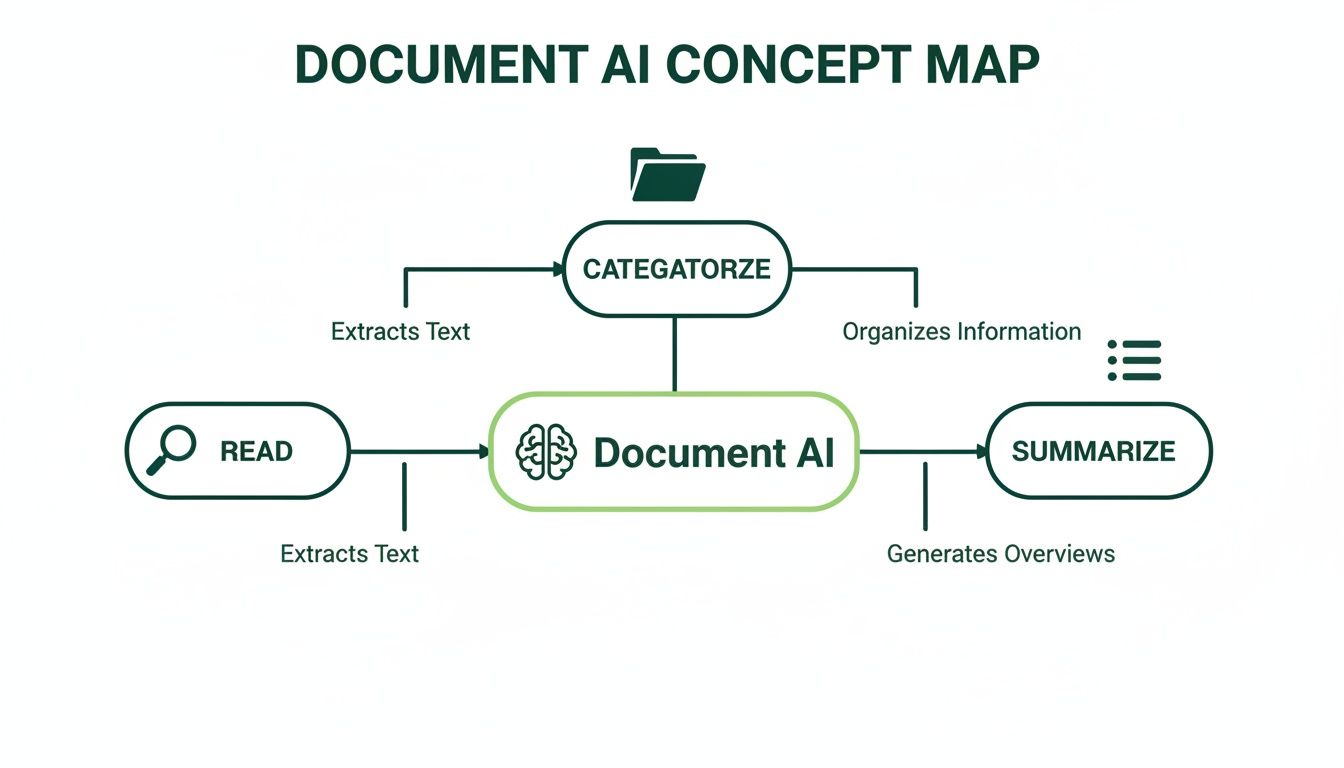
As you can see, it’s not just about reading. The intelligence here is in categorizing and summarizing, turning messy, raw text into knowledge you can actually use.
Its Eyes: Layout Analysis
If NLP is the brain, then Layout Analysis gives Document AI its "eyes." A document isn’t just a long string of text; its structure holds critical clues. We instinctively know a header from a footer or how to read a table, but for a computer, that’s a huge challenge.
Layout Analysis is what lets the AI see the page visually. It figures out where a table starts and ends, tells columns apart from rows, and recognizes that a signature line at the bottom serves a different purpose than a title at the top.
Key Takeaway: Without layout analysis, the text from a complex table would just be a jumbled mess of words and numbers. With it, Document AI preserves the structure, so the data stays accurate and makes sense.
On a utility bill, for instance, layout analysis helps the AI pinpoint the number under the "Amount Due" column. It knows that figure is the important one, not just another random number on the page.
Its Detective: Entity Extraction
Once the brain (NLP) understands the words and the eyes (Layout Analysis) understand the structure, one last specialist comes in: Entity Extraction. Think of this part as a detective, scanning the document for specific clues or "entities."
These entities are the key pieces of information you need to run your business. Things like:
- Names: The vendor on an invoice or the people in a contract.
- Dates: The issue date, due date, or effective date.
- Monetary Values: Subtotals, taxes, and the final amount owed.
- Addresses: The "ship to" vs. the "bill to" location.
- Invoice Numbers: The unique ID needed for tracking and payment.
This detective work is incredibly precise. On an insurance form, Entity Extraction can find and isolate the policy number and date of the incident while ignoring all the dense legal text around them. It turns a static document into a clean, organized set of data points ready to be plugged into your other systems.
Document AI vs. OCR: Seeing Versus Understanding
When people talk about processing documents, the first thing that usually comes to mind is Optical Character Recognition (OCR). And while OCR is definitely part of the equation, it’s just the starting line of a much longer race.
Pitting Document AI against OCR is like comparing a camera to a human brain. One captures an image; the other actually understands what it's seeing.
Just the Words, Please
Traditional OCR is the digital version of a photocopier. Its only job is to look at an image—like a scanned PDF or a JPG—and translate the shapes it sees into machine-readable text. It spots the letters and numbers and spits out a digital text file.
That's a powerful first step, but its limitations become obvious fast. The output is usually just a flat wall of text, completely stripped of its original structure and context. The tech itself has been around for a while, and you can read more about the evolution of OCR for PDFs to see how far the basics have come.
Going Beyond Basic Text Recognition
Document AI picks up right where old-school OCR leaves off. It takes that raw, digitized text and layers on intelligence to figure out what it all means.
It doesn't just see the word "Invoice." It understands it's looking at a financial document with specific fields like a due date, a vendor name, and a total amount. This is a huge leap from just "seeing" to truly "understanding."
While basic OCR might dump a jumble of numbers from a table into a text file, Document AI recognizes the table's structure—identifying individual rows and columns to keep the relationships between the data intact.
Think of it this way: OCR tells you what words are in a book. Document AI reads the book, understands the plot, identifies the characters, and can summarize the key themes for you.
A Clear Comparison
The difference really snaps into focus when you put their abilities side-by-side. One is a simple tool for digitization; the other is a platform for intelligent automation.
Comparing Document AI and Traditional OCR
This table breaks down exactly what sets them apart.
| Feature | Traditional OCR | Document AI |
|---|---|---|
| Primary Goal | Convert image text to digital text. | Extract, structure, and understand data. |
| Context | Lacks contextual awareness. | Understands document type and meaning. |
| Structure | Often loses original layout and tables. | Preserves tables, forms, and layout. |
| Data Output | Unstructured block of text. | Structured data (JSON, CSV). |
| Adaptability | Relies on templates; breaks with new formats. | Learns and adapts to layout variations. |
At the end of the day, OCR is just one component inside most Document AI systems. It provides the raw material, but the real magic comes from the layers of natural language processing and layout analysis that follow.
This combination is what lets Document AI handle the messy, unpredictable nature of real-world business documents, turning static files into information you can actually use.
Real-World Applications of Document AI

Theory is one thing, but where does the rubber meet the road? That's where Document AI really proves its worth, shifting from a cool tech concept to a practical tool that fixes real business headaches. It’s not about some far-off future; this is about making work better, right now.
Instead of just scanning documents into a digital filing cabinet, Document AI gives those files a brain. It turns slow, manual processes that everyone hates into fast, automated workflows. Let's look at a few examples of how it's changing the game in different industries.
Revolutionizing Finance and Accounting
The accounts payable (AP) department is often buried under a mountain of invoices. They come in as PDFs, scanned images, and email attachments—all with different layouts. Someone has to manually find the vendor name, invoice number, due date, and every single line item. It’s slow, boring, and a perfect recipe for expensive mistakes.
Document AI flips the script entirely.
- Before Document AI: An AP clerk spends their day typing data from hundreds of invoices. One small typo could mean paying an invoice twice or missing a payment, hurting vendor relationships and the company's cash flow.
- After Document AI: The system automatically pulls invoices from an email inbox, figures out what they are, and extracts all the key info with over 95% accuracy. That structured data is checked against purchase orders and sent straight to the accounting software for approval, often without a human lifting a finger.
This shift cuts invoice processing time from days down to minutes. It frees up the finance team to focus on analyzing spending instead of just typing numbers. In fact, studies show automation can slash the cost of processing a single invoice by more than 80%.
For businesses just getting started, a specialized tool like an AI-powered invoice extractor can provide a valuable entry point. It solves a very specific, painful problem with an immediate payoff.
Streamlining Healthcare and Patient Records
Healthcare runs on paperwork. We’re talking patient intake forms, lab results, insurance claims, and medical histories. The speed and accuracy of handling this information can directly impact patient care. Manual data entry doesn’t just risk critical errors—it also creates delays when doctors need information fast.
Document AI is like a super-efficient assistant for hospitals and clinics. When a new patient fills out their forms, the AI can instantly pull out their name, date of birth, insurance policy, and medical history, then plug it directly into the hospital's Electronic Health Record (EHR) system.
This automation delivers huge wins:
- Faster Patient Onboarding: Less time in the waiting room filling out the same information over and over.
- Improved Data Accuracy: Slashes the risk of human error when transcribing sensitive medical details.
- Simplified Claims Processing: Quickly finds the right codes and data from patient files to submit insurance claims, which means faster reimbursements.
Accelerating Legal and Contract Management
The legal world is built on dense, complicated documents—contracts, court filings, depositions. Manually reading a 100-page contract to find one specific clause is a nightmare, and an expensive one at that. Document AI offers a much smarter way.
Legal teams can use this tech to tear through thousands of contracts in minutes. The AI can spot and pull out key clauses about things like liability, payment terms, or termination conditions, and lay them out in a clean summary. This lets lawyers quickly compare terms across dozens of agreements or check for compliance with new laws.
And it doesn't stop there. Document AI is also improving customer service with AI-powered support tools that can read and categorize documents users upload. From finance to healthcare to law, the story is the same: Document AI turns piles of static information into a powerful asset that saves time, cuts costs, and reduces errors.
Choosing the Right Document AI Solution
Picking the right document AI solution can feel like a huge task. The market is flooded with options, from giant enterprise platforms to smaller, specialized tools, and they all promise to finally tame your paperwork monster. But here’s the secret: the goal isn't finding the "best" tool, it's about finding the right tool for your specific documents, budget, and team.
The process starts with a good, hard look at your own workflows. What are you actually dealing with every day? Are they perfectly uniform invoices that always look the same? Or are they messy, unstructured contracts where no two look alike? Knowing your documents is step one, and it’s the most important one.
First, Figure Out What You Really Need
Before you even start looking at vendors, look inward. A great implementation starts with knowing exactly what problem you need to solve. Answering a few key questions will give you a clear roadmap and stop you from paying for powerful features you’ll never touch.
Start by looking at these three areas:
- Document Types: Are you handling structured forms (like W-9s), semi-structured files (like invoices), or totally unstructured text (like legal agreements)? The more varied and complex the documents, the smarter the AI needs to be.
- Processing Volume: How many documents are you wrestling with per day, week, or month? A tool built for a small business handling 100 invoices a month is completely different from one designed for a massive company processing millions.
- Integration Needs: Where does all that extracted data need to end up? The best solution will plug right into the software you already use, whether that’s an accounting system, a CRM, or a cloud storage folder.
Pre-Trained Models vs. Specialized Solutions
Once you know what you need, you’ll hit a major fork in the road. Should you go with a general-purpose, pre-trained model from a big tech company or a more focused, industry-specific solution? Each has its own strengths.
Pre-trained models are incredibly powerful and flexible, but they often require some technical know-how to get them dialed in for your exact needs. On the other hand, specialized solutions are built for a specific industry—like healthcare or finance—and come ready to understand documents like insurance claims or bills of lading right out of the box. For a deeper look, our guide on leveraging a document processing API can help clear up the technical side of things.
A key trend to watch is the growth of Intelligent Document Processing (IDP), a specialized branch of document AI. This area is exploding because it’s laser-focused on solving these tricky business automation problems. The global IDP market is projected to jump from USD 3.22 billion in 2025 to nearly USD 43.92 billion by 2034. Read more about this explosive market growth.
Your Quick Evaluation Checklist
To keep things simple, use this checklist to compare your options. It makes sure you’re judging every tool by the same core standards.
- Accuracy and Reliability: Does the vendor share clear numbers on its accuracy? Ask for a demo using your own sample documents to see how it performs in the real world.
- Scalability: Can this solution grow with you? Make sure it can handle more documents down the road without falling apart or costing a fortune.
- Ease of Use: How easy is it to actually use? A good tool should feel intuitive and empower your team, not force them to become data scientists overnight.
- Security and Compliance: How is your data kept safe? Look for vendors with solid security practices and compliance with standards like GDPR or HIPAA if they apply to your industry.
- Support and Training: What happens when you get stuck? Good customer support is a lifesaver, especially when you're getting set up or run into a problem.
Getting Started With AI-Powered PDF Tools
 You don't need a massive, enterprise-level system to tap into the power of Document AI. The same smart technology that drives huge automation projects is now built into simple tools you can use every day for your PDF workflows. Think of them as your first step into a much smarter way of handling documents.
Instead of just turning a document into text, these AI features actually understand your files. They analyze the content and structure to make routine tasks way faster and more accurate. This is a big leap from basic file management to intelligent document interaction, and it solves common headaches without a steep learning curve.
A Smarter Way to Compare Documents
We’ve all been there: trying to compare two versions of a PDF. Manually spotting tiny changes in a dense contract or a long report is a nightmare and a recipe for mistakes. A quick visual scan is almost guaranteed to miss a subtle but critical tweak in wording or a number. This is exactly where an AI-powered comparison tool, like the one offered by PDFPenguin, shows its real value.
This kind of tool puts the core ideas of document AI to work on a very specific problem. It does way more than just lay two images on top of each other. The AI reads and understands the content, layout, and meaning of both files to give you a clean, itemized list of every single difference.
It intelligently flags and highlights every change:
- Text Additions: Any new words, sentences, or paragraphs are clearly marked.
- Text Deletions: Anything removed from the original is shown for a quick review.
- Style Changes: The AI even catches formatting changes like bolding, italics, or font sizes.
This intelligent analysis means nothing gets missed. It creates a trustworthy audit trail, turning a frustrating manual review into a quick, automated job. You can sign off on changes knowing that every single modification has been found and accounted for.
Expanding Your AI-Enhanced Workflow
But the intelligence doesn't stop at comparisons. Accessible AI features are being woven into other key PDF functions, creating a smoother and more efficient workflow. These tools are designed to handle the boring, time-consuming tasks so you can focus on what’s actually in the document.
Imagine you need to combine a bunch of reports into one organized file. An AI-enhanced merge tool could suggest the most logical order based on the content or file names. Or, a smart splitting tool could automatically break up a massive file into logical chapters based on its headings and structure.
These features are your entry point into the world of document AI. By making them part of your daily routine, you start automating the manual grind that slows you down. Every interaction with your PDFs becomes quicker, smarter, and more reliable—the perfect first step toward a fully intelligent document workflow.
Of course. Here is the rewritten section, adopting the voice, tone, and style of the provided examples.
Document AI: Your Questions Answered
As you start thinking about using this technology, a few practical questions always come up. Is it secure? Can it handle messy real-world documents? Do I need a team of engineers to use it? Let's get those questions answered so you can move forward with confidence.
How Secure Is My Data with Document AI?
This is the big one, and for good reason. Any reputable Document AI provider puts security first. They use measures like end-to-end encryption to protect your files while they’re being sent and while they’re stored. Your documents aren't just sitting exposed on a server.
Most platforms also stick to strict international standards like GDPR for privacy and SOC 2 for operational security. For really sensitive files, look for vendors with clear data deletion policies—this ensures your information is only held for as long as it needs to be. Always check a provider’s security certifications to make sure they match what you need.
Can Document AI Handle Handwritten Text and Complex Tables?
Yes, and this is where modern Document AI really shines. The technology has made huge leaps in dealing with the messy formats we see every day. Advanced AI models are trained on millions of examples of handwriting, which lets them read handwritten notes on forms and applications with surprisingly high accuracy.
For tangled-up tables, the layout analysis feature is the hero.
- It spots rows and columns, even when they’re nested inside each other.
- It figures out merged cells and other weird formatting.
- It pulls the data out into a clean, structured format (like a spreadsheet row), not just a messy block of text.
Accuracy still depends on how clear the writing is and how complex the table is, but today’s tools are worlds apart from older systems. They can often turn a chaotic table into clean, usable data without a human having to fix it.
Do I Need to Be a Developer to Use Document AI?
Not anymore. While developers can still use APIs from cloud platforms to build completely custom solutions, the technology has become way more accessible. A whole new wave of user-friendly tools has brought Document AI to everyone, not just programmers.
Many of today's Intelligent Document Processing (IDP) platforms have no-code or low-code interfaces. These tools let business users set up automated workflows and even train custom AI models using simple drag-and-drop menus. This means you don’t need to write a single line of code to start solving your document headaches.
Ready to put AI to work on your PDFs? The tools from PDFPenguin are designed to be fast, simple, and powerful. Try our AI-powered Compare tool or our smart merging and splitting features to see how easy it is to manage your documents more intelligently. Start simplifying your workflow today at https://www.pdfpenguin.net.