
If you’re still manually keying in invoice data from PDFs, you’re not just being inefficient—you’re actively draining company resources. While automated solutions using Optical Character Recognition (OCR) and AI can get the job done for as little as $2-$3 per invoice, sticking with the old way is a costly mistake.
Why Manual Invoice Entry Is Costing You Time and Money
Processing invoices is a core business function, but for too many companies, it's a major operational bottleneck. Every time someone on your team opens a PDF and manually types that information into an accounting system, you open the door to human error and wasted hours. It’s a quiet but constant drain on your bottom line.
Think about a small business owner juggling dozens of vendor invoices every week. Manually entering every single line item, invoice number, and due date is painfully tedious. That kind of repetitive work leads to fatigue, making it all too easy to transpose a couple of numbers or misread a vendor's name. A simple typo can snowball into overpayments, late fees that damage supplier relationships, or compliance nightmares during an audit.
The True Cost of Manual Processing
It's easy to underestimate the financial hit from all this manual work. But recent industry reports paint a pretty stark picture: the average cost to process a single invoice by hand can climb to a staggering $22.75. That number accounts for labor, time spent fixing mistakes, and approval delays.
If you handle thousands of invoices a month, that adds up to a massive, unnecessary expense. In fact, 63% of accounts payable teams lose over 10 hours a week just to invoice data entry, and roughly 39% of all manually processed invoices contain errors. Those stats scream that there's a huge, costly problem here. You can find more insights about global AI invoice processing trends to see the full scope.
For many teams, the "cost" isn't just financial. It's the opportunity cost—the strategic work your finance team could be doing instead of spending hours on monotonous data entry.
Beyond Simple Inefficiency
The trouble with manual extraction goes way deeper than just slow processing times. This old-school approach carries a few hidden risks that can seriously impact your company’s financial health and agility.
Here are a few of the biggest issues with manual data entry:
- Increased Risk of Fraud: Manually entered invoices are a nightmare to track and verify, which makes it much easier for fraudulent or duplicate invoices to slip through the cracks.
- Lack of Visibility: When all your critical data is locked away in PDFs and entered sporadically, it’s almost impossible for leadership to get a real-time view of cash flow and outstanding liabilities.
- Scalability Challenges: As your business grows, so does the invoice volume. A manual process simply can't keep up, leading to inevitable backlogs and an overwhelmed, burnt-out staff.
At the end of the day, clinging to manual methods just isn't a sustainable strategy. The need to extract invoice data from PDF files efficiently is critical for any modern business looking to boost accuracy, cut costs, and free up its teams for more valuable work.
Finding the Right Invoice Extraction Method for Your Needs
Choosing how to extract invoice data from a PDF isn't a one-size-fits-all decision. The best tool depends entirely on your situation—from the number of invoices you process to how comfortable you are with technology. A freelancer juggling five invoices a month has completely different needs than a growing business that handles thousands.
For a one-off task, just manually copying and pasting the data might be the fastest way to get it done. It’s free, requires zero setup, and takes just a few minutes. But let's be real: that approach falls apart fast. As soon as you have more than a handful of invoices, it becomes a recipe for errors and a massive time sink.
First, Take Stock of Your Workload
Before you even look at tools, you need a realistic picture of your workload. Are you dealing with a small pile of simple, standardized invoices each month? Or are you drowning in hundreds of documents from different suppliers, each with its own quirky layout? The answer points you in the right direction.
A small retail shop, for example, might get 20-30 invoices a month from the same group of vendors. For them, a simple template-based extractor or a basic OCR tool is often a perfect fit. These tools learn the layout of one invoice format and apply that "map" to future invoices from the same source. They’re affordable but can't handle new or varied formats without you setting up a new template.
On the other hand, a larger enterprise is often swimming in a flood of unstructured PDFs in different formats and languages. That’s where AI-powered solutions really come into their own. They use machine learning and natural language processing to understand an invoice, finding fields like "Invoice Number" or "Total Amount" no matter where they are on the page.
The Inevitable Shift to Automation
The business world is quickly leaving manual entry behind. The e-invoicing market, valued at $2.47 billion in 2024, is expected to nearly double to $4.29 billion by 2032. Why? Because automation can lead to huge 60-80% cost savings.
While it's true that 37% of businesses still get paper invoices that force manual work, the trend is crystal clear. If you want a deeper dive, you can explore more data on the growth of electronic invoice management to see where the market is headed.
The bottom line is this: pick a method that can grow with you. A manual process that feels fine today could become a huge bottleneck next quarter. Thinking about scalability now is a strategic move, not just an operational one.
To make the decision easier, let’s break down the most common methods. Each has its place, and understanding their pros and cons will help you make a smart choice that saves you headaches down the road.
Comparing Invoice Data Extraction Methods
This table compares different methods to extract invoice data from PDFs, helping you choose the best fit based on volume, accuracy needs, and technical skill.
| Method | Best For | Pros | Cons | Avg. Accuracy |
|---|---|---|---|---|
| Manual Copy-Paste | One-off tasks or very low volume (1-10 invoices/month) | Free, no setup required | Extremely time-consuming, high risk of human error, not scalable | 80-95% |
| Basic OCR Tools | Low to moderate volume with simple, consistent layouts | Faster than manual, digitizes text from scans | Struggles with complex tables, poor scan quality, varied formats | 85-97% |
| Template-Based | Moderate volume from a fixed set of suppliers | Highly accurate for known formats, affordable | Requires manual setup for each new invoice layout, inflexible | 95-99% |
| AI/ML Powered | High volume, varied and complex invoice formats | Adapts to new layouts automatically, handles complexity, scalable | Higher cost, can have a slight learning curve | 95%+ |
Ultimately, the goal is to find a system that frees you from tedious data entry so you can focus on more important work. Whether you start with a simple OCR tool or jump straight to an AI solution, automating this process is one of the best investments you can make for your business.
Your Practical Guide to Using OCR and AI Tools
Okay, let's get into the good stuff. Using modern tools like Optical Character Recognition (OCR) and AI is where you’ll see the biggest leap in efficiency. This isn't about learning to code; it's about letting smart software do the heavy lifting. These tools are built to read documents just like a human would, turning a static, unsearchable PDF into clean, structured data you can actually use.
But before you even think about uploading, remember the old saying: "garbage in, garbage out." It’s especially true here. A high-quality scan is the foundation for everything that follows.
Preparing Your PDFs for Extraction
A quick quality check before you start can save you a world of headaches later. AI is incredibly powerful, but it’s not magic. It works best with clean source material. A blurry, crooked, or poorly lit scan forces the OCR engine to guess, and that’s a recipe for errors.
Here are a few practical things I always do to make sure my PDFs are ready to go:
- Resolution is Key: Always, always scan at 300 DPI (dots per inch) or higher. This gives the software enough detail to clearly identify each letter and number. Anything less is asking for trouble.
- Straighten and Crop: Make sure the invoice is straight. Most scanning software has a "deskew" function that fixes crooked pages automatically. Also, crop out any unnecessary background—the less noise the tool has to deal with, the better.
- Combine Multi-Page Invoices: If an invoice is more than one page, merge them into a single PDF file. This tells the tool to treat the entire document as one record, so you don't lose line items or totals from the second page.
The goal is simple: make the document as easy for a machine to read as possible. If you’re squinting to read the text yourself, you can bet the software will struggle even more. A few seconds of prep work now will save you minutes of fixing mistakes later.
The shift to these tools is happening fast for a reason. The AI invoice processing market is expected to jump from $2.8 billion in 2024 to an incredible $47.1 billion by 2034. Why? Because manual processing costs $15-$22.75 per invoice and takes weeks, while AI-powered platforms can get it done for just $2-3 in 3-5 days. The numbers don't lie. If you want to dig deeper, you can explore detailed accounts payable statistics and see the clear ROI for yourself.
A Real-World Extraction Scenario
Let's walk through a common example. An invoice from a new supplier lands in your inbox. Instead of opening your accounting software and manually punching in every detail, you just upload the PDF to an AI extraction tool.
Immediately, the software gets to work. Its OCR engine—which you can learn more about in our guide to making PDFs searchable—scans the document and converts the image of the text into actual, editable text. From there, the AI layer kicks in, analyzing the content to identify key fields based on context and standard invoice layouts.
Within seconds, the structured data pops up on your screen:
- Invoice Number: INV-2024-1138
- Vendor Name: Summit Office Solutions
- Invoice Date: October 28, 2024
- Total Amount: $452.50
- Line Items: It even pulls out the table data, listing each item, its quantity, and price.
From there, it's a quick glance to verify the information before exporting it directly into your accounting system. The entire process to extract invoice data from a PDF takes less than a minute. No more manual entry, and far fewer chances for human error.
How to Validate and Clean Your Extracted Data
Automated tools are powerful, but they’re not magic. After you’ve extracted invoice data from a PDF, you hit what might be the most important step of all: validation.
Skipping this quality check is a recipe for disaster. Small errors flow downstream into your accounting systems, causing everything from payment delays to inaccurate financial reports. A quick human review is your final line of defense.
This review doesn’t have to be a painful, line-by-line slog. The trick is to work smart by focusing on the most common points of failure and setting up a few simple, repeatable checks.
Establishing Simple Validation Rules
The goal here is to catch errors fast. Instead of reading every single field, you can create a few rules to flag potential issues, turning a long review into a quick scan. Think of it as a mental checklist that guides your eyes straight to the important stuff.
Here are a few common validation checks to start with:
- Cross-Reference Totals: Does the subtotal plus tax actually equal the final total? This simple math check instantly tells you if the key financial numbers were pulled correctly.
- Check Against Purchase Orders (POs): If the invoice is tied to a PO, do the numbers match up? This is a killer way to prevent overpayments or billing mistakes.
- Spot Common OCR Errors: Keep an eye out for frequent character mix-ups. The usual suspects are 'O' being read as '0', '1' as 'l', or '5' as 'S'. A quick scan of invoice numbers or amounts often reveals these tiny but costly mistakes.
The human-in-the-loop step isn’t about distrusting automation; it’s about perfecting it. A 99% accuracy rate sounds great until that 1% error causes a thousand-dollar overpayment. Your review turns high accuracy into reliable, trusted data.
Standardizing Data for Consistency
Invoices come in a dizzying array of formats, which means your extracted data will be all over the place. A supplier from the US might use MM/DD/YYYY, while one in Europe uses DD-MM-YYYY. Without standardization, this data is a mess to analyze.
Cleaning is all about transforming this raw data into a uniform format your systems can actually use.
For instance, you could set a rule to convert all dates to the ISO 8601 standard (YYYY-MM-DD). You can also standardize currency symbols, strip extra characters from vendor names, and ensure all totals are formatted with two decimal places.
This cleaning process is also the perfect time to structure the data for export. If you're sending everything to a spreadsheet, getting the structure right now is key. For more on that, check out our guide on how to seamlessly convert your PDF data to Excel.
By validating and cleaning your data, you make sure what enters your financial system is accurate, consistent, and ready to go.
Building a Fully Automated Invoice Workflow
Once you’ve nailed how to extract invoice data from a PDF, the real fun begins: full-scale automation. It's one thing to extract data from a single file, but it's a game-changer to build a seamless, end-to-end system that chews through a constant stream of documents without you lifting a finger.
This is all about connecting the dots, moving from one-off tasks to a workflow that basically runs itself.
The first move is setting up an automated drop-off point. Instead of you manually uploading PDFs, you can tell your system to watch a specific place for new invoices. This could be a shared folder on your network drive or even a dedicated email inbox. Modern tools can monitor these spots 24/7, grabbing any new invoice the second it arrives and kicking off the entire extraction process on its own.
Connecting Your Tools for a Seamless Flow
Integration is where the magic really happens. Once the data is pulled and checked, it shouldn't just sit there. The whole point is to push it directly into the systems where it actually needs to go, wiping out that last bit of manual data entry for good.
This usually means linking your extraction tool to your other software using APIs. For example:
- Accounting Software: Automatically create draft bills in platforms like QuickBooks, Xero, or NetSuite with the extracted vendor name, invoice number, line items, and total amount.
- ERP Systems: Push validated data straight into your enterprise resource planning software to update procurement records and financial ledgers.
- Communication Tools: Fire off alerts in Slack or Microsoft Teams to ping the right person when an invoice needs approval or if something’s off (like a missing PO number).
This diagram breaks down the essential steps for making sure the data flowing through your new system is clean and reliable.
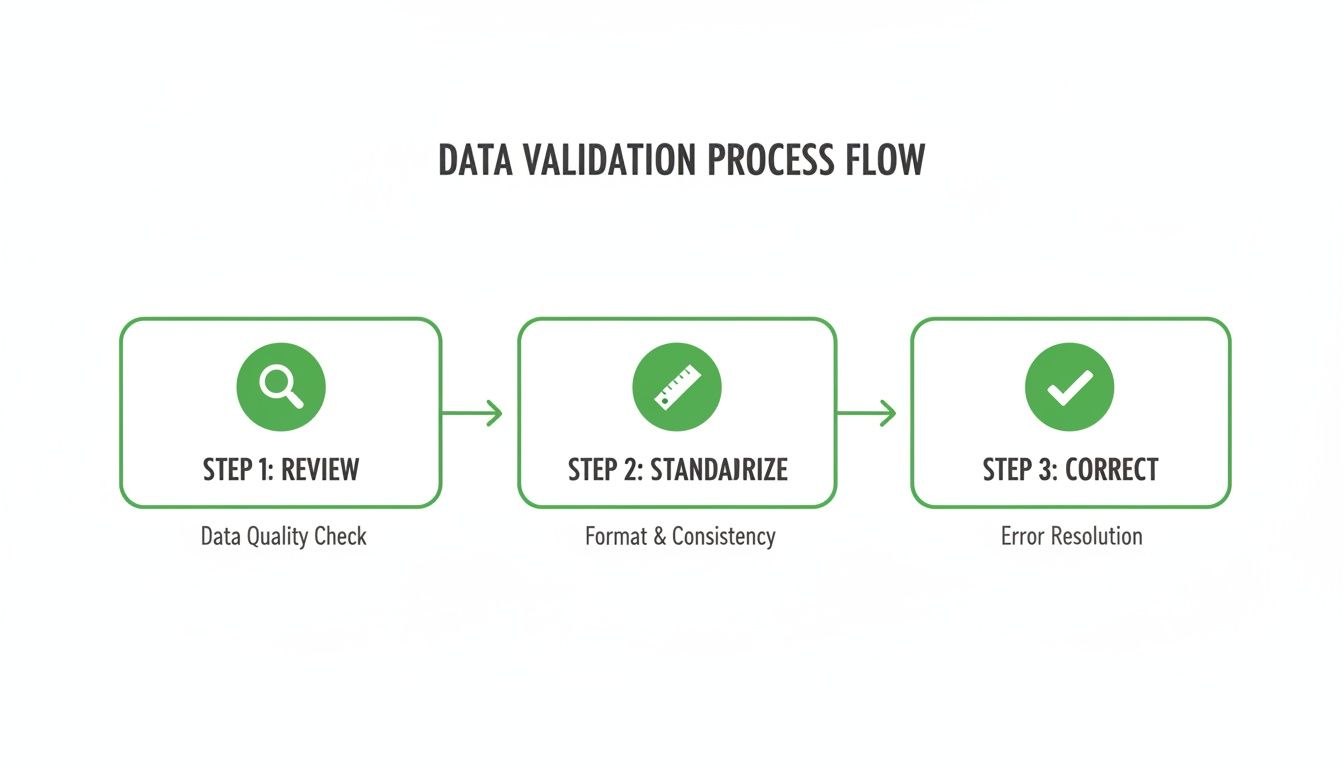
As you can see, a solid workflow isn't just about extraction—it's about having a repeatable process to review, standardize, and correct data before it ever hits your financial systems.
A small e-commerce business I worked with set up this exact workflow. They created an email rule to forward all vendor PDFs to an invoice processing tool. The tool pulled the data, then automatically pushed it into their accounting software as a draft bill. The result? It saved their bookkeeper over 15 hours a month.
The best part of a fully automated system is that it grows with you. As your business scales and the number of invoices climbs, the workflow just handles the extra load without you needing to hire more people.
To see which tools make this possible, check out our guide on the best invoice extractor solutions out there. Building this kind of system transforms accounts payable from a tedious cost center into a lean, efficient part of your operation.
Got Questions About Invoice Data Extraction?
Jumping into automated invoice processing always brings up a few questions. Teams often ask about accuracy, security, and whether these tools can actually handle their specific documents. Let's clear up some of the most common concerns so you can feel confident moving away from manual data entry.
How Accurate Is It, Really?
This is usually the first question, and for good reason. How reliable are these AI and OCR tools? The answer is: surprisingly reliable.
Modern platforms often hit accuracy rates of 95% or higher on clear, machine-readable invoices. This isn't magic—the AI has been trained on millions of documents, so it gets incredibly good at spotting common fields and layouts.
Can These Tools Handle Scanned Invoices?
Yes, absolutely. Most modern extraction platforms are built to handle both digital PDFs and scanned paper invoices. They use Optical Character Recognition (OCR) to turn a picture of text into actual, usable characters a computer can read.
Of course, the quality of the OCR depends entirely on the quality of the scan. For the best results, you'll want to make sure your scans are:
- High-Resolution: 300 DPI (dots per inch) is the industry standard. Anything less, and you risk fuzzy characters.
- Straight and Clean: Skewed pages, weird shadows, or dark smudges can easily confuse the OCR engine.
- Good Contrast: The text should be dark and the background light and clean.
A crisp, high-quality scan can give you results just as accurate as a file that was digital from the start.
Is It Safe to Upload My Invoices Online?
Security is another big one, especially with sensitive financial data on the line. Reputable online services take data protection very seriously. When you're looking at a tool, check for a few key security indicators.
Always choose a provider that uses secure HTTPS encryption for all data transfers and has a transparent privacy policy. Many professional-grade platforms are compliant with standards like GDPR and SOC 2, and some offer options to automatically delete your files after processing.
For companies with super strict data rules, an on-premise solution might be a better fit, since it keeps everything inside your own network. But for most businesses, a trusted cloud-based tool strikes the right balance between convenience and protection, letting you extract invoice data from PDF files without the security headache.
Ready to stop wasting time on manual data entry? PDFPenguin offers a suite of easy-to-use, browser-based tools to simplify your document workflows. Try our fast and friendly PDF solutions today at https://www.pdfpenguin.net.